Secure Online Browsing on Public Wi-Fi: A Comprehensive Guide
The rise of public Wi-Fi networks has transformed the way we access the internet on-the-go. From coffee shops to airports, public Wi-Fi hotspots are now a common feature in many establishments. However, despite their convenience, public Wi-Fi networks can be a breeding ground for cyber threats and compromise your online security. In this article, we will delve into the risks associated with public Wi-Fi and provide you with essential tips to ensure secure online browsing on public Wi-Fi networks.
Understanding the Risks of Public Wi-Fi
Public Wi-Fi networks are often free and open, making them an attractive target for hackers. According to various studies, a significant percentage of users have experienced security issues while using public Wi-Fi. These risks can include:
- Man-in-the-middle (MITM) attacks: Hackers intercepting your data by posing as a legitimate Wi-Fi access point.
- Evil twins: Fake Wi-Fi hotspots that mimic the name of a legitimate network.
- Sniffing and eavesdropping: Hackers accessing your data by sniffing Wi-Fi packets.
- Malware and viruses: Infecting your device with malware through a public Wi-Fi network.
Protecting Yourself on Public Wi-Fi
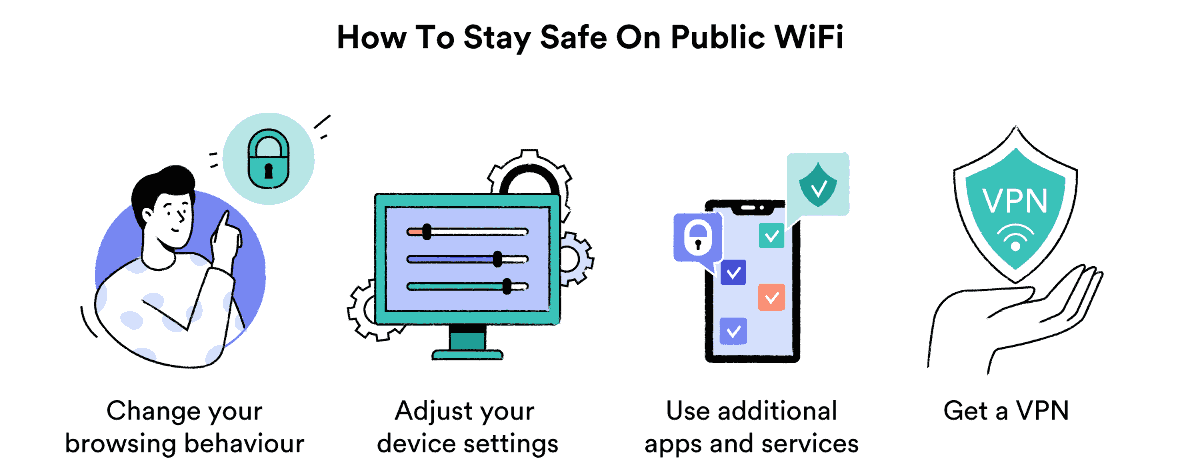
Fortunately, there are several measures you can take to protect yourself on public Wi-Fi networks:
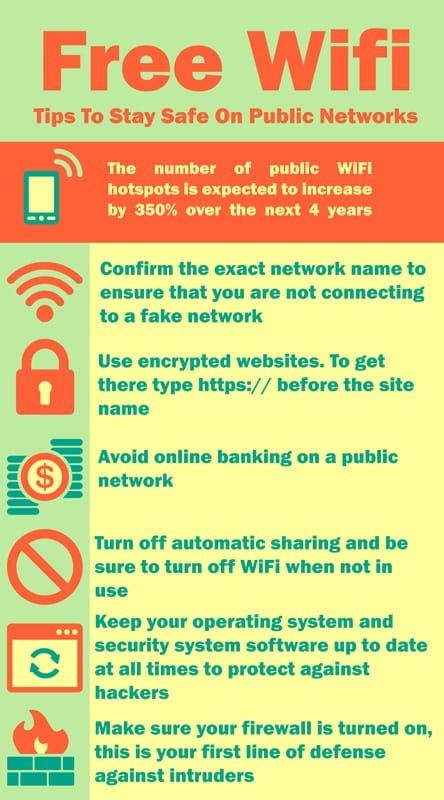
- Use a Virtual Private Network (VPN): A VPN encrypts your internet traffic, making it virtually impossible for hackers to intercept your data.
- Choose a secure website: Opt for websites with "HTTPS" in the address bar and a padlock icon, indicating an encrypted connection.
- Avoid sensitive transactions: Refrain from logging into sensitive accounts, such as online banking or email, while connected to public Wi-Fi.
- Use a secure search engine: Ensure the search engine you use on public Wi-Fi is secure and doesn't track your search history.
- Keep your device and apps up-to-date: Regularly update your device and apps to ensure you have the latest security patches.
- Use strong, unique passwords: Avoid using the same password for multiple accounts and choose strong, unique passwords for sensitive accounts.

Additional Tips for Secure Online Browsing on Public Wi-Fi
- Scan for Wi-Fi QR codes: When scanning a QR code, ensure the website URL is encrypted and secure.
- Use a VPN for public Wi-Fi: A VPN provides an additional layer of security and protection for your online activities.
- Be cautious of public charging stations: Public charging stations can be used to steal your data by infecting your device with malware.
- Use a password manager: Password managers can help you generate strong, unique passwords and store them securely.
- Monitor your online activity: Regularly check your online activity to detect any suspicious behavior or login attempts.
Conclusion
Public Wi-Fi networks are a convenience that comes with risks. However, by taking the necessary precautions and following the tips outlined above, you can browse securely online on public Wi-Fi networks. Remember to use a VPN, choose secure websites, and avoid sensitive transactions while connected to public Wi-Fi. By doing so, you can minimize your exposure to cyber threats and enjoy a secure online experience while on-the-go.
Resources
For further information on VPNs, password managers, and online security best practices, you can visit the following resources:
- CISA (Cybersecurity and Infrastructure Security Agency)
- McAfee VPN
- ZoogVPN
- Night Owl Security

/images/2023/09/06/public-wifi-safety-1.png "Public Wi-Fi: An ultimate guide to the risks + how to stay safe - NortonTM")