Setting Up OBS for 1440p Recording: A Comprehensive Guide
Recording high-quality gameplay at 1440p resolution is a dream for many gamers and content creators. However, achieving this resolution comes with its own set of challenges, especially when it comes to setting up OBS for 1440p recording. In this article, we'll take you through a step-by-step guide on setting up OBS for 1440p recording, ensuring you get the best possible video quality and smooth performance.
System Requirements for 1440p Recording
To record at 1440p resolution, you'll need a powerful computer with a high-end graphics card, processor, and RAM. Here are the minimum system requirements:
- Intel Core i7 or AMD Ryzen 7 processor
- NVIDIA GeForce 1070 or AMD Radeon RX 580 graphics card
- 16 GB RAM or more
- Fast storage (SSD) for storing recorded files
Step-by-Step Guide to Setting Up OBS for 1440p Recording
Follow these steps to set up OBS for 1440p recording:
Step 1: Configure Video Settings
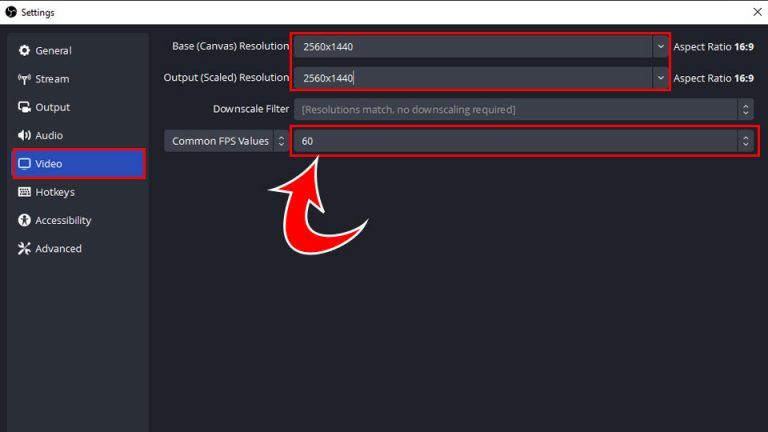
Go to OBS Studio's settings menu and navigate to the "Video" tab. Here, you'll need to set the following:
- Resolution: 2560 x 1440 (1440p)
- Frame rate: 60 FPS
- Bitrate: 25000-30000 kbps (depending on your internet connection)
Step 2: Configure Output Settings
Next, navigate to the "Output" tab and set the following:
- Output: FFmpeg
- Output format: MP4
- Codec: H.264 or H.265 (depending on your preference)
Step 3: Configure Audio Settings
Go to the "Audio" tab and set the following:
- Sample rate: 48 kHz
- Bitrate: 128-256 kbps (depending on your preference)
Step 4: Configure Encoding Settings
Go to the "Encoding" tab and set the following:
- Encoder: x264 or x265 (depending on your preference)
- Presets: medium to high (depending on your preference)
Step 5: Test Your Settings
Before recording, test your settings by viewing a few minutes of gameplay. Check for any dropped frames, encoding warnings, or other issues. Adjust your settings as needed to achieve smooth performance and high-quality video.
Best OBS Recording Settings for 1440p
Here are some recommended OBS recording settings for 1440p resolution:
- Video settings:
- Resolution: 2560 x 1440
- Frame rate: 60 FPS
- Bitrate: 25000-30000 kbps
- Output settings:
- Output: FFmpeg
- Output format: MP4
- Codec: H.264 or H.265
- Audio settings:
- Sample rate: 48 kHz
- Bitrate: 128-256 kbps
- Encoding settings:
- Encoder: x264 or x265
- Presets: medium to high
Remember to adjust these settings according to your specific needs and hardware configuration.
Conclusion
Setting up OBS for 1440p recording requires some technical knowledge, but with this guide, you'll be able to achieve high-quality video recordings. Remember to test your settings and adjust them as needed to achieve smooth performance and the best possible video quality.



![The Best OBS Setting for Recording in 2026 [Detailed Guide] - OBSBOT](https://www.fonedog.com/images/screen-recorder/start-recording-obs.png "The Best OBS Setting for Recording in 2026 [Detailed Guide] - OBSBOT")


![How to Increase OBS Recording Quality [Best Settings & Guide 2026]](https://streamspecialists.com/wp-content/uploads/2025/07/image-7-300x141.png "How to Increase OBS Recording Quality [Best Settings & Guide 2026]")



![OBS Studio User Group [moderated] | Hello group! | Facebook](https://tecnobits.com/wp-content/uploads/2025/03/Sources.jpg "OBS Studio User Group [moderated] | Hello group! | Facebook")