Learning Python with Object Oriented Programming
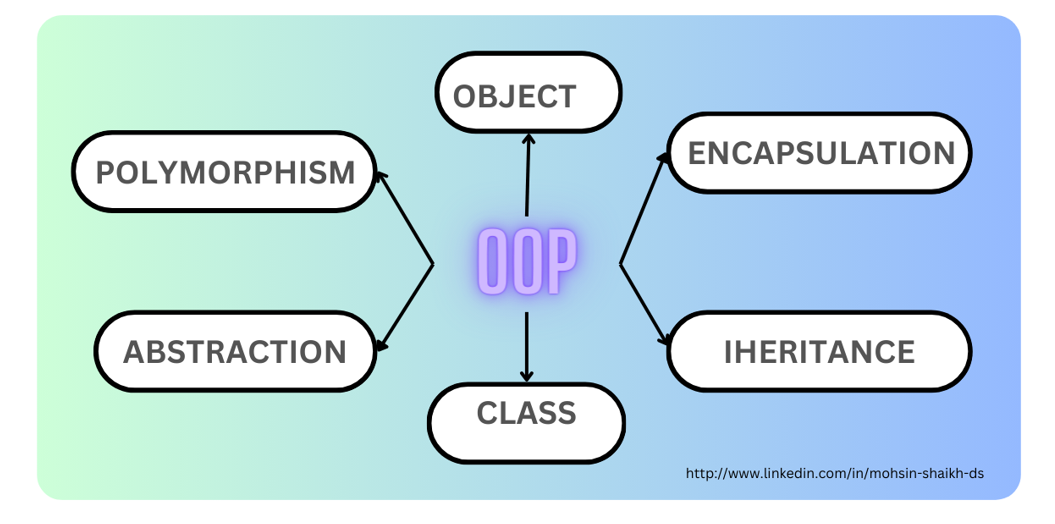
In today's world, Python has become a popular programming language due to its simplicity and ease of use. As a beginner, learning Python with object-oriented programming (OOP) can be a great way to develop robust and scalable applications. In this article, we will explore the basics of OOP in Python, including classes, objects, inheritance, encapsulation, and polymorphism.
What is Object-Oriented Programming?
Object-Oriented Programming (OOP) is a programming paradigm that revolves around the concept of objects and classes. It allows developers to model real-world entities in code, making programs more organized, reusable, and easier to maintain. In Python, OOP provides a powerful way to structure code, making it more modular, reusable, and easier to maintain.
Classes and Objects
In Python, a class is a blueprint or a template that defines the properties and behavior of an object. An object, on the other hand, is an instance of a class, which has its own set of attributes (data) and methods (functions). To create an object in Python, you need to define a class using the `class` keyword, followed by the name of the class and a colon.
- Class: A class is a blueprint or a template that defines the properties and behavior of an object.
- Object: An object is an instance of a class, which has its own set of attributes (data) and methods (functions).
Instantiating an Object
To create an object from a class, you need to use the `()` operator. The `()` operator is used to call the constructor method, which is a special method that is automatically called when an object is created. The constructor method is used to initialize the attributes of the object.
For example:
class Dog:
    def __init__(self, name, age):
        self.name = name
        self.age = age

my_dog = Dog('Max', 3)
print(my_dog.name)  # Output: Max
print(my_dog.age)   # Output: 3
Inheritance
Inheritance is a fundamental concept in OOP, where a child class inherits the properties and behavior of a parent class. The child class inherits all the attributes and methods of the parent class and can also add new attributes and methods or override the ones inherited from the parent class.
For example:
class Animal:
    def __init__(self, name):
        self.name = name

    def sound(self):
        print('The animal makes a sound')

class Dog(Animal):
    def __init__(self, name, breed):
        super().__init__(name)
        self.breed = breed

    def sound(self):
        print('The dog barks')

my_dog = Dog('Max', 'Golden Retriever')
print(my_dog.name)     # Output: Max
print(my_dog.breed)    # Output: Golden Retriever
my_dog.sound()         # Output: The dog barks
Encapsulation
Encapsulation is the concept of hiding the implementation details of an object from the outside world and only exposing the necessary information through public methods. This helps to protect the data from being modified accidentally or maliciously.
For example:
class BankAccount:
    def __init__(self, account_number, balance):
        self.__account_number = account_number
        self.__balance = balance

    def get_balance(self):
        return self.__balance

    def deposit(self, amount):
        self.__balance += amount

my_account = BankAccount('123456789', 1000)
print(my_account.get_balance())  # Output: 1000
my_account.deposit(500)
print(my_account.get_balance())  # Output: 1500
Polymorphism
Polymorphism is the ability of an object to take on multiple forms. This can be achieved through method overloading or method overriding. Method overloading occurs when multiple methods with the same name but different parameters are defined in a class. Method overriding occurs when a subclass provides a different implementation of a method that is already defined in its parent class.
For example:
class Shape:
    def area(self):
        pass

class Circle(Shape):
    def __init__(self, radius):
        self.radius = radius

    def area(self):
        return 3.14 * self.radius ** 2

class Rectangle(Shape):
    def __init__(self, width, height):
        self.width = width
        self.height = height

    def area(self):
        return self.width * self.height

my_circle = Circle(5)
print(my_circle.area())  # Output: 78.5

my_rectangle = Rectangle(4, 6)
print(my_rectangle.area())  # Output: 24





![Python Exercises, Practice, Challenges [385+ Exercises] - PYnative](https://pythonlobby.com/wp-content/uploads/2020/08/object-oriented-programming-in-python.jpg "Python Exercises, Practice, Challenges [385+ Exercises] - PYnative")